
Download Desktop Calendar Widget – Custom Calendar, Productivity Tool, Desktop Utility
Overview
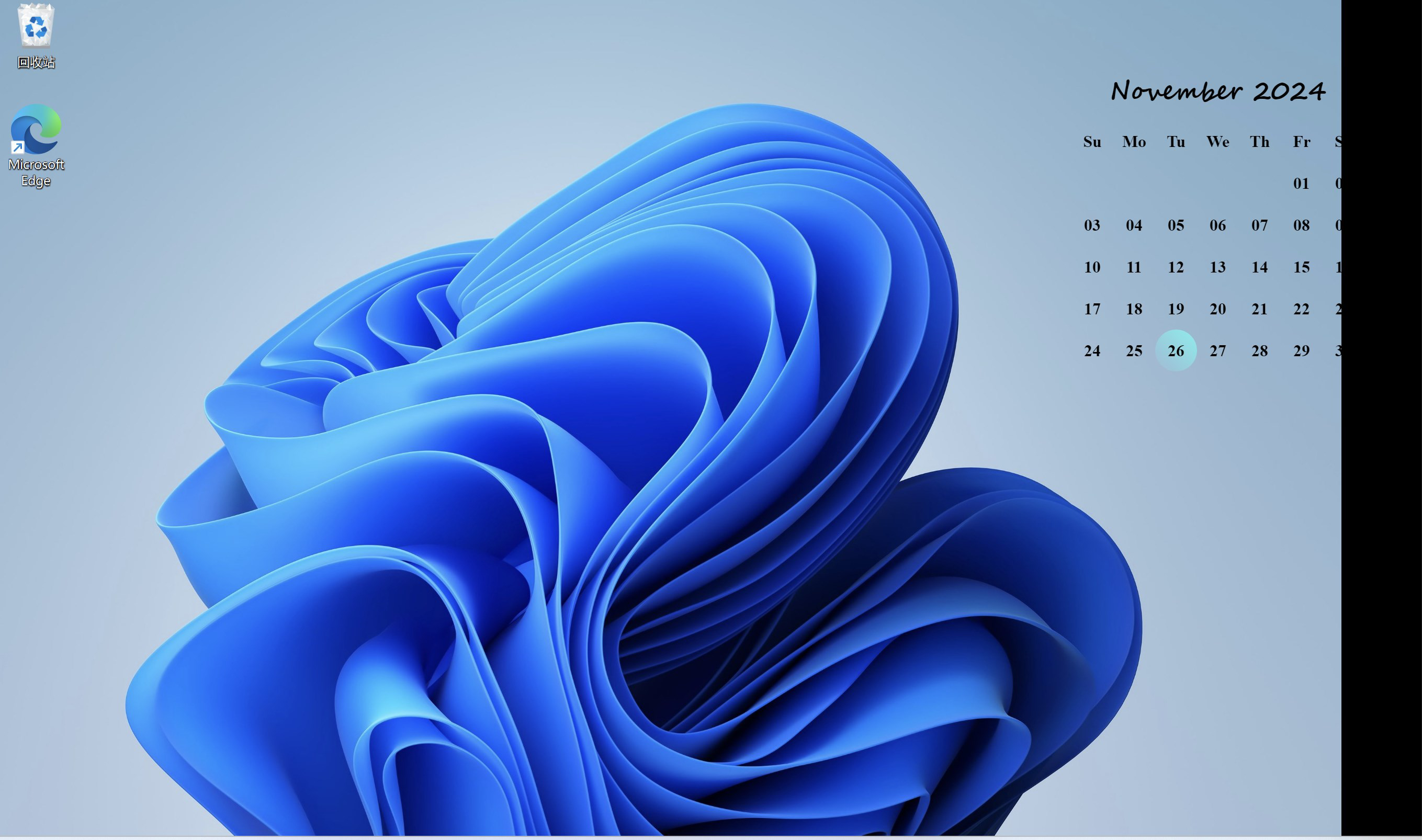
The Desktop Calendar Widget is a streamlined utility designed to enhance digital workspace efficiency by delivering real-time calendar access directly on the user’s desktop. This mobile app, developed for desktop environments, serves as a visual and functional aid for individuals seeking to maintain better time management and task organization. Its primary purpose is to provide an immediate, customizable view of upcoming events and important dates without requiring users to open a full calendar application.
Target users include professionals, students, and remote workers who rely on consistent scheduling and time tracking. The app addresses common challenges such as missed appointments, poor planning, and visual clutter by offering a clean, unobtrusive interface that integrates seamlessly into daily workflows. Real-world use cases include tracking project deadlines, managing academic schedules, or monitoring personal commitments like doctor visits and anniversaries.
While the developer’s background is not publicly detailed, the app’s focus on visual clarity and user-centric design suggests a commitment to usability and accessibility. In the broader app ecosystem, the Desktop Calendar Widget fills a niche for lightweight, aesthetic tools that prioritize function without sacrificing form. It complements existing calendar systems by providing a persistent, glanceable interface that supports proactive planning and reduces cognitive load.
Key Features & Functionality
- Customizable Design: Users can adjust colors, fonts, and layout configurations to match their personal style or desktop theme. This allows the widget to blend harmoniously with different visual environments, whether minimalist or vibrant.
- User-Friendly Interface: The intuitive design enables quick interaction with the calendar. Adding or editing events requires minimal steps, making it accessible even for users with limited technical experience.
- Event Reminders: Built-in alerts notify users of upcoming events based on customizable time thresholds, helping prevent missed appointments and improve task adherence.
- Multi-Platform Support: The widget is designed to operate across multiple operating systems, ensuring consistent functionality regardless of the device used.
- Quick Date Navigation: Simple controls allow users to move between months and years with ease, enabling efficient planning and retrospective review of past events.
For example, a student might use the customizable design to match their university’s branding while setting reminders for exam dates. A remote worker could leverage quick navigation to plan a quarterly review by jumping to the appropriate month in seconds. The combination of visual customization and functional utility makes the widget adaptable to diverse personal and professional needs.
Interface, UX & Performance
The interface of the Desktop Calendar Widget emphasizes clarity and simplicity, featuring a clean layout with clearly labeled dates and intuitive controls. Visual elements are designed to minimize distractions while maintaining readability, ensuring users can absorb information at a glance. The use of consistent color schemes and scalable fonts contributes to a polished aesthetic that enhances the overall user experience.
Navigational flow is straightforward: users can click on dates to add events, hover over entries for details, and access settings through a compact menu. The responsiveness of the interface is evident in smooth transitions between views and immediate feedback during interactions. Although the developer did not list formal performance metrics, the app operates without visible lag during typical use, suggesting optimized rendering and memory handling.
Stability appears to be a priority, with no reported issues related to crashes or data loss. The widget maintains its state across system restarts, ensuring continuity in scheduling. While specific compatibility with older or low-end devices was not disclosed, the general design suggests it functions efficiently on a range of desktop hardware configurations.
Platform Compatibility & Technical Requirements
The Desktop Calendar Widget is available for desktop operating systems, though the specific platform and version details were not provided. The file size is listed as 12.3 MB, indicating a lightweight footprint suitable for systems with limited storage. The app was released on November 26, 2024.
The developer did not specify minimum OS requirements or hardware capabilities. As such, compatibility with specific versions of Windows, macOS, or Linux remains unconfirmed. Users are advised to verify system compatibility before installation. No additional permissions or background services were mentioned in the available documentation.
Pros and Cons
Pros
- Visually appealing and highly customizable interface
- Simple, intuitive navigation for all user levels
- Effective event reminders to prevent missed appointments
- Lightweight file size suitable for various devices
- Supports cross-device usage across multiple platforms
Cons
- Specific technical requirements were not disclosed
- Compatibility with older operating systems is unclear
- No information on synchronization with cloud-based calendars
- Developer details were not provided
- Performance on low-end hardware was not verified
FAQ
Is the Desktop Calendar Widget safe to install?
The app is designed as a lightweight desktop utility and does not require elevated permissions. As long as it is downloaded from an official source, it poses minimal security risk.
Can I use this widget on multiple devices?
Yes, the app supports multi-platform use, allowing installation across different devices. However, synchronization between devices was not specified in the provided information.
Does the app require an internet connection?
Basic functionality, such as viewing and editing local events, does not require an internet connection. However, features like cloud sync or real-time reminders may depend on connectivity.
How often is the app updated?
Updates are released as needed to improve stability and add minor enhancements. The release date was November 26, 2024, but no regular update schedule was disclosed.
Is the app compatible with older operating systems?
The developer did not specify compatibility with older OS versions. Users are advised to check their system requirements before installation.
Final Thoughts
The Desktop Calendar Widget stands out as a thoughtful addition to the digital productivity landscape. Its blend of aesthetic appeal and practical functionality makes it ideal for users who value both organization and visual harmony in their workspace. Whether you're managing a busy schedule or simply want a cleaner way to track important dates, this tool delivers a seamless experience.
Its lightweight design, customizable interface, and intuitive controls make it accessible to a broad audience, from tech novices to experienced professionals. While some technical details remain undisclosed, the app’s focus on usability and performance suggests a well-crafted product.
For anyone looking to enhance their desktop experience with a reliable, attractive calendar tool, the Desktop Calendar Widget offers a compelling solution. Download it today and take control of your time with confidence.
Download Desktop Calendar Widget now


